If you’ve ever looked at an industrial panel PC, I bet your first thought was something like, “Wait, why does this thing have so many USB ports? That looks like way more than the one or two on my laptop or home desktop.” When I first started out selling industrial panel PCs, I used to get that question all the time—from plant managers scratching their heads during a walkthrough, from automation engineers huddled over schematics trying to match devices, even from maintenance techs who’d only ever used consumer-grade tech for 15 years. Back then, I’d just rattle off a list: “They’re for connecting things, right?” But that answer always felt incomplete. Over the last 12 years, I’ve seen every possible use for those extra USB ports, in factories, warehouses, oil rigs, food processing plants—places where downtime costs money, where devices have to work in heat, dust, and vibration that would kill a regular computer in a week. Today, I want to break down exactly what those USB ports on an industrial panel PC are used for, why they’re not just extra space, and why they matter so much when you’re running a business that can’t afford to wait for a broken machine. Industrial Panel PC

First, let’s get one thing straight: industrial USB ports aren’t the same as the ones on your MacBook or consumer desktop. Sure, they look the same—Type-A, sometimes Type-C if the panel PC is newer—but they’re built to handle totally different conditions. A consumer USB port might stop working if you yank a cable too hard, or if it’s exposed to a drop of coolant. An industrial USB port is rated for IP65 or higher, designed to withstand 10,000 insertions, and tested to work in temperatures from -40°C to 85°C. That matters because every use case I’m going to talk about relies on that durability.
Let’s start with the most common use, because it’s the one I hear about every single week from clients: connecting peripheral devices that run the day-to-day operations of a facility. If you’re running a packaging line, you need a barcode scanner to track boxes as they move from station to station. A factory floor needs a laser etcher to mark product serial numbers, or a thermal printer to print shipping labels on the spot. A warehouse might use a mobile barcode scanner that syncs to the panel PC to update inventory counts. All of these use USB, and industrial panel PCs have 4, 6, even 8 USB ports because you can’t just have one. If you’re running a line that produces 1,000 parts an hour, swapping out a scanner because the only USB port it uses is broken isn’t an option. I once had a food processing client who had five USB devices connected to their panel PC—two barcode scanners, a label printer, a temperature sensor, and a handheld scale. If that panel PC only had two ports, they’d have to use a hub—but hubs are a weak point in industrial settings. A cheap consumer hub might fail after a month in a damp meat processing plant, but an industrial USB hub rated for that environment costs twice as much as adding a couple extra ports to the panel PC. We started installing extra ports as standard a few years ago after that client had three hub failures in six months, and their uptime went up 12% almost overnight. It’s not just peripherals, either. Some facilities connect cameras directly to the panel PC via USB for machine vision—small cameras that check if a bottle is sealed, if a part has a scratch, if a label is aligned correctly. Those cameras need USB, and if you have multiple inspection points on a line, you need multiple ports. Last year, an automotive parts plant we work with installed six USB-connected machine vision cameras on their steering wheel assembly line, all connected to the panel PC that runs the line’s control software. They had the option to connect them over Ethernet, but Ethernet for machine vision requires extra setup, extra cables, and extra configuration. USB is plug-and-play, and with industrial ports, it’s reliable enough for 24/7 operation.
Next, there’s data logging and backup, which is where industrial settings are totally different from home use. At home, you might back up your laptop to an external hard drive once a month. In a factory, you need to log every single data point from every machine, every hour of every day. Pressure readings, temperature, line speed, defect rates—all of that data is critical for compliance, for predictive maintenance, for figuring out where you can improve efficiency. You can’t rely on cloud storage for that, not when the plant might have spotty internet, or none at all, or when a cyberattack could take down your entire network. So people use USB flash drives, external SSDs, even USB hard drives to back up data directly to the panel PC. But industrial data logging is way more intensive than consumer backup. A panel PC running a printing line might generate 50GB of data a day, so you need a USB drive that can keep up. And you need enough USB ports that you don’t have to disconnect one drive to plug in another. I’ve seen plants that swap out USB drives every shift, using a separate port for each drive so they don’t have to wait for the panel PC to boot up to swap a drive. Some even use USB to connect to portable data loggers that move between machines. If you have 10 stamping presses on a floor, you can plug one portable data logger into each press’s USB port to collect data, then move it to the panel PC to compile weekly reports. For pharmaceutical and medical device manufacturers, this data logging isn’t just convenient—it’s a regulatory requirement. The FDA requires them to track every step of production, and USB-connected backup drives are a simple, reliable way to meet that requirement without adding extra complicated software. I had a medical device client last year who was using cloud-based backup, but they got hit with a ransomware attack that locked their entire network for three days. They switched to backing up 10% of their daily data to a separate USB drive each shift, and that small change let them get back to full operation in 45 minutes when another attack hit a few months later. The cost of the extra USB ports on their panel PC was less than a week of downtime, which is exactly why it’s worth it.
Then there’s firmware updates and maintenance, which is probably the use that surprises people the most. When you have a 24/7 operation, you can’t just shut down the line for an hour to update the panel PC’s software or the firmware of connected devices. But sometimes updates are critical—they fix a bug that’s causing defects, they add new features that let you track more data, they improve security to protect against cyber threats. Industrial panel PCs have USB ports for a reason here: you can plug in a USB drive with the update file, and install it directly, without connecting to the plant’s network. That means you don’t have to expose the panel PC to the whole network during updates, which reduces cyber risk, and you don’t have to take the line down for more than 10 or 15 minutes. We’ve had clients who used to schedule updates for weekends, when the line was shut down, that would take four or five hours. Now they do the same updates at shift change, between when one crew leaves and another arrives, and it takes 10 minutes. That small change adds up to hundreds of hours of production time a year. It’s not just the panel PC itself, either. Many of the peripherals we connect—barcode scanners, scanners, machine vision cameras—have firmware updates that come out periodically. Instead of updating each one individually over the network, which is complicated and time-consuming, you can plug a USB drive into the panel PC, run a single update tool, and update all connected devices at once. That’s a huge time saver for maintenance techs, who often have 10 or 15 devices to update on a single shift. I remember a textile mill client a few years ago who had 20 weaving machines, each with a connected sensor that needed firmware updates every quarter. Their old system required a tech to go to each machine, connect a laptop, and update it one by one. With their new panel PC, they can plug in a single USB drive with all the updates, run it through the central panel PC’s USB port, and update all 20 sensors in 45 minutes. That used to take three full days of work.
Another use case that’s growing fast is connecting legacy devices. A lot of facilities have equipment that’s 10, 15, even 20 years old, that works perfectly, but only has a serial port or an older communication protocol like RS-232 or parallel port. It’s not worth replacing that equipment, because it works, it’s paid off, and it’s reliable. But you need to connect it to your new industrial panel PC to get data from it, to integrate it into your overall facility management system. So people use USB adapters—USB to RS-232, USB to parallel, USB to Ethernet—but that adapter has to be reliable. A consumer USB adapter might work for a week or two, then stop working, especially on a factory floor with vibration and temperature swings. Industrial USB adapters are built to handle that, and pairing them with extra USB ports on the panel PC means you don’t have to fight for a port. We’ve had clients with old CNC machines, old conveyor controls, even old temperature monitors that only use serial ports, all connected via USB adapters to their panel PC. Without those extra USB ports, they’d have to replace all that legacy equipment, which would cost tens of thousands of dollars, when adding a $20 USB adapter and an extra $50 in panel PC port capacity costs a fraction of that. Last year, we worked with a metal stamping plant that had 12 old stamping presses, each with a parallel port that only worked with their old control system. They wanted to add predictive maintenance, which required collecting data from each press, so we installed a panel PC with 8 USB ports and used USB-to-parallel adapters for each press. They didn’t have to replace any of their old presses, and they started collecting data within a week. The alternative would have been replacing all 12 presses, which would have cost over $2 million. That’s the value of those USB ports, right there—they let you integrate old and new technology without breaking the bank.
I’d be remiss if I didn’t mention disaster recovery and troubleshooting, too. Industrial equipment breaks, sometimes at the worst times. If a panel PC crashes or the control software glitches, you need to get it back up and running fast. USB ports let you create a bootable USB drive with a backup image of the panel PC’s operating system. Instead of having to re-install the OS from scratch, which can take hours and requires specialized knowledge, you can plug in the bootable USB drive, restore the backup, and get the panel PC back up and running in 15 or 20 minutes. That’s a huge difference when downtime costs $10,000 or more an hour, as it does in many manufacturing facilities. We had a customer in the automotive industry a couple years ago who had a panel PC crash in the middle of a night shift. The line was down, and they were estimating it would take 4 hours to re-install the OS and reload all the software. Their maintenance tech plugged in the bootable USB drive we’d set up for them, and had the line back up in 18 minutes. He told me that single USB drive paid for the cost of the panel PC’s extra ports in one use. Troubleshooting is another big one. If a scanner stops working, you can plug it into a different USB port on the panel PC to see if it’s a port issue or a device issue. If a sensor is giving bad data, you can plug a spare USB sensor into the panel PC to test the line, without having to take the original device off the machine. That saves time during troubleshooting, which means less downtime.
Now, I want to talk about the biggest mistake I see people make when choosing an industrial panel PC. A lot of buyers look at the number of USB ports and think, “I’ll only need 2, that’s enough.” But I’ve seen time and time again that 2 is never enough. Add in the fact that you might want to connect a new device in six months, or that one port might fail after a year of heavy use, and you’re already in a bind. Industrial panel PCs with 6 or 8 USB ports are standard for a reason—they leave room for growth, for unexpected needs, for replacing a port without having to use a hub. I always tell clients to count how many USB devices they think they’ll need right now, then add two more. If they think they’ll need 3, get 5. If they think 5, get 7. It’s a small cost up front, but it saves thousands in downtime and troubleshooting later.
At the end of the day, the USB ports on an industrial panel PC aren’t just empty slots for cables. They’re the backbone of your operations. They connect the tools that let you track production, run quality control, comply with regulations, fix problems fast, and integrate old and new technology. When I’m walking a client through our panel PCs, I don’t just list how many USB ports they have. I explain what each one can do, based on their specific operation. A food processing plant needs ports for temperature sensors and label printers. A warehouse needs ports for barcode scanners and inventory scanners. An automotive plant needs ports for machine vision cameras and legacy device adapters. That’s why those ports matter—they’re not a one-size-fits-all feature, they’re tailored to what you need to get done, 24 hours a day, 365 days a year.
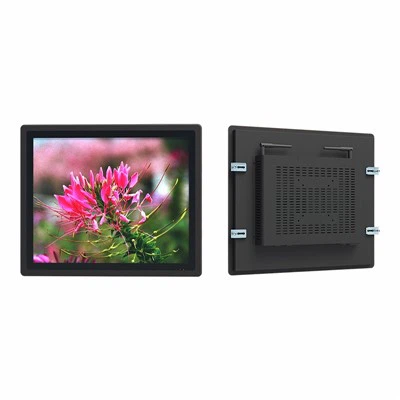
If you’re in the market for an industrial panel PC, or if you’re looking to upgrade your current setup to fix downtime issues, I’m here to help. We’ve worked with facilities of all sizes, from small manufacturers to large corporations, to build panel PCs that fit exactly what they need, with the right number of ports for their specific applications. We don’t sell one-size-fits-all devices, and I’ll take the time to walk through your needs, count how many ports you’ll actually use, and make sure you have the reliability you need for 24/7 operation. If you’re tired of hubs failing, of not having enough ports for your devices, or of downtime that eats into your profits, I’d be happy to chat about your needs and find the right solution for you.
Nano ITX Motherboard References:
Industrial Ethernet Alliance. (2021). "Industrial USB Port Design and Application Standards." IEA Technical Report 007-2021.
National Institute of Standards and Technology (NIST). (2022). "Cybersecurity Considerations for Industrial Control Systems USB Devices." NIST Internal Report 8300-Rev. 1.
Automation Fair 2023. "Field Report: USB Integration in Modern Manufacturing." Association for Advancing Automation (A3).
Food and Drug Administration (FDA). (2020). "Guidance for Industry: Data Integrity and Compliance with CGMP." Section 4: Electronic Records and Signatures. International Society of Automation (ISA). (2021). "Legacy Device Integration in Industrial Automation Systems." ISA-95.03.02-2021.
Shenzhen HJS Technology Group
Shenzhen HJS Technology Group is one of the most experienced industrial panel pc manufacturers and suppliers in China, featured by quality products and good service. Please rest assured to buy CE approved industrial panel pc made in China here from our factory. For price consultation, contact us.
Address: F10, Wanhe Technology Building C, No. 7 HuiTong Road, Fenghuang Street, Guangming New District, Shenzhen. China.
E-mail: info@hjs-pc.com
WebSite: https://www.hjs-pc.com/
